How to Use Dhivehi Fonts in Canva: Introducing the “Dhivehi Fonts” App
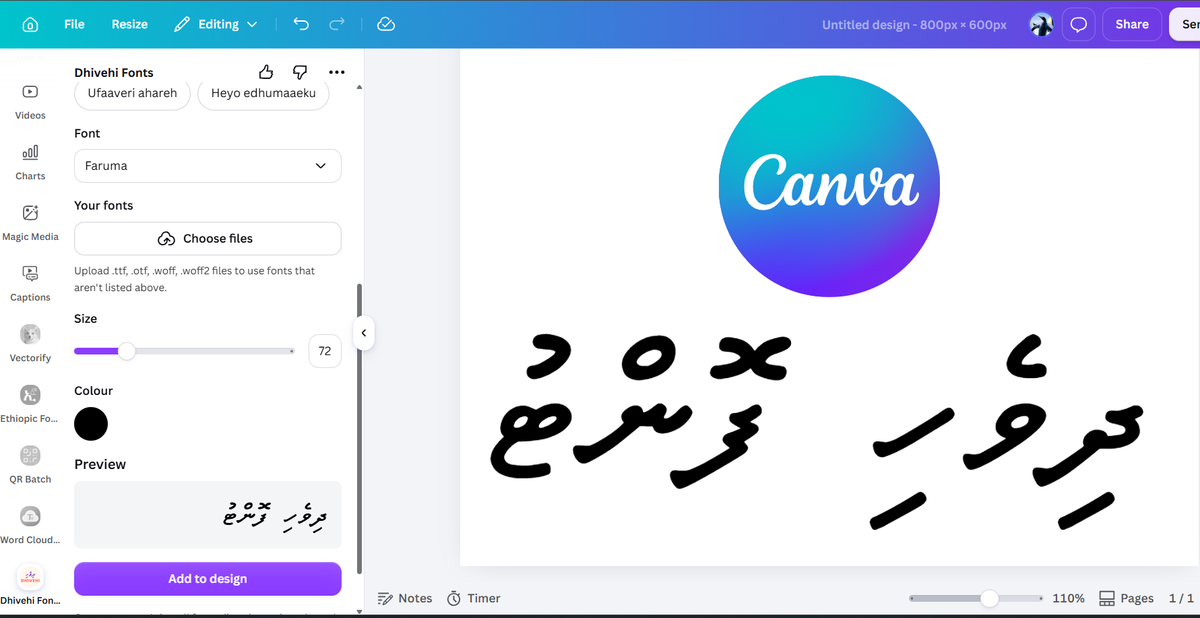
Designing social media graphics, posters, announcements, and presentations in Dhivehi just became effortless.
For years, Maldivian designers, content creators, marketers, and students have run into the same barrier: Canva does not natively support Thaana text formatting well. Letters often detach, vowel accents (fili) shift out of place, and uploading custom brand fonts requires a paid Canva Pro subscription.
To bridge this gap, I created Dhivehi Fonts for Canva, a dedicated Canva integration now officially published and available in the Canva Apps marketplace.
With this app, anyone can instantly generate sharp, scalable Dhivehi vector (SVG) text directly on their canvas—working seamlessly across both Canva Free and Canva Pro accounts.
The Problem with Designing in Thaana on Canva
Because Thaana is written from right to left (RTL) with unique diacritical vowel marks placed above and below consonants, web-based design engines often render it incorrectly.
Until now, the common workarounds included:
- Typing Dhivehi in desktop software (Photoshop, Illustrator, or Word), taking screenshots or exporting transparent PNGs, and uploading them manually.
- Paying for Canva Pro to upload
.otf/.ttffiles—only to discover that text direction or fili alignment still broke inside the standard text box. - Spending hours re-exporting image assets every time a client or editor spotted a typo.
The Dhivehi Fonts app completely removes this friction by rendering your text as native, scalable vector graphics directly inside the Canva workspace.
Key Features of Dhivehi Fonts for Canva
1. 100% Free & Pro Compatible
You do not need a paid Canva Pro or Canva Teams subscription to use your favorite Dhivehi typography. The app runs smoothly for all Canva users.
2. High-Resolution Vector (SVG) Rendering
Unlike blurry PNG exports, the app converts your Thaana text into crisp vector graphics (SVG). Whether you are creating a square 1080×1080 Instagram post or designing an A1 roll-up banner for print, your text stays razor-sharp at any resolution.
3. Accurate Thaana Glyphs & Fili Placement
No more flipped consonants or misaligned accents. Every font style is rendered with typographic accuracy, preserving the natural flow and balance of the Thaana script.
4. A Growing Library of Curated Typefaces
Choose from traditional, formal Thaana fonts suitable for official documents, press releases, and news cards, as well as modern, expressive display typefaces designed for social media branding.
Step-by-Step: How to Add Dhivehi Text to Your Canva Design
Adding Thaana to your artwork takes only a few seconds:
[ Open Canva ] ➔ [ Click 'Apps' in Sidebar ] ➔ [ Search 'Dhivehi Fonts' ] ➔ [ Type & Insert ]
- Launch Canva: Open your existing project or start a new design.
- Open the Apps Tab: Look at the left toolbar in the editor and click on Apps.
- Search for the App: In the search bar, type “Dhivehi Fonts” and select the app.
- Input Your Text: Enter or paste your Thaana script into the text field.
- Choose Your Font: Preview and select the typeface that suits your layout.
- Insert & Customize: Click to add the text to your canvas. Once inserted, you can freely resize, rotate, align, and change the fill color just like any standard vector graphic.
Frequently Asked Questions (FAQ)
Is the Dhivehi Fonts app free to use on Canva?
Yes. The app is completely accessible on standard Canva Free accounts as well as Canva Pro and Canva for Education.
Can I change the color of the Dhivehi text once added?
Yes. Because the text is placed on your artboard as a clean SVG graphic, you can select it and change its fill color using Canva's standard color picker.
Will the text lose quality if I enlarge it for print?
No. Because it uses vector format (SVG), you can scale the text to any dimension—from mobile screens to large billboard sizes—without any pixelation or blurriness.
Do I need to install any keyboard or fonts on my local computer?
No local font installation is needed. As long as you have a standard Thaana keyboard input enabled on your computer or phone to type in the app’s text box, the app handles font rendering cloud-side.
Start Designing in Dhivehi Today
Ready to elevate your Dhivehi design workflow without juggling external converters or third-party image exports?
👉Install Dhivehi Fonts on Canva
Have feedback, feature requests, or specific Dhivehi fonts you’d like to see included in upcoming updates? Leave a comment below or get in touch!